Structured Generation for Tool Calling
With the rise of agentic systems, tool calling has become a primary use case for LLMs. While models are trained to follow a tool's schema, they still don't reliably comply, requiring systems to validate outputs and handle failures with retries. Structured generation solves this by enforcing schema adherence, yet it remains largely absent from agentic workflows. This gap is a missed opportunity: adopting structured generation could significantly reduce failure rates, make these systems far more reliable, and make open-source models competitive with frontier models on these workflows.
We built dotlambda to address this problem. It is a structured-generation product that uses a DSL to describe the model's wire format for tool calling, and guarantees that every generation is schema-compliant.
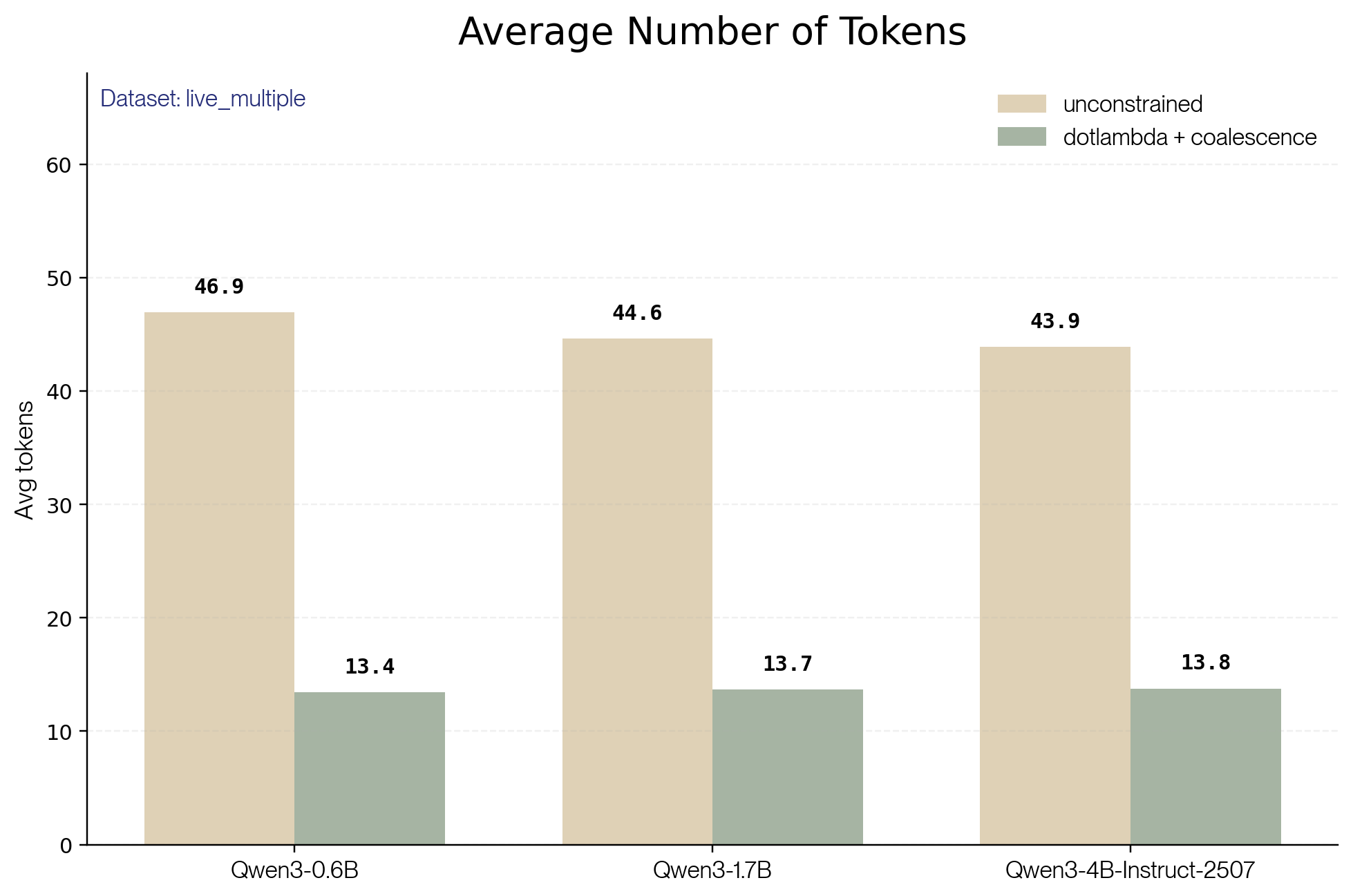
TL;DR. On BFCL's live_multiple benchmark, dotlambda reduces the tool-call failure rate by more than 10% across every model we tested, and cuts total tokens generated by 10-20% versus the unconstrained baseline. Adding coalescence on top brings token savings to roughly 65%.
Evaluation Setup
To evaluate dotlambda, we use the BFCL evaluation benchmark and compare performance against an unconstrained baseline model. Here we present results for BFCL's live_multiple dataset, one of the largest and most challenging subsets, where models must select from multiple candidate tools in realistic scenarios.
Here's an example of an evaluation prompt provided to the model (live_multiple_838-178-13). To evaluate correctness, the model response is parsed to extract the tool calls and compared to the ground truth provided by BFCL.
<|im_start|>system
# Tools

You may call one or more functions to assist with the user query.

You are provided with function signatures within <tools></tools> XML tags:
<tools>
{
  "type": "function",
  "function": {
    "name": "Music_3_PlayMedia",
    "description": "Plays the specified track on the designated device, optionally filtering by artist and album.",
    "parameters": {
      "type": "object",
      "required": ["track"],
      "properties": {
        "track": { "type": "string", "description": "The title of the track to be played." },
        "artist": { "type": "string", "description": "The name of the artist performing the track. If not specified, any artist is considered acceptable.", "default": "any" },
        "device": { "type": "string", "description": "The designated media player device where the music will be played.", "enum": ["Living room", "Kitchen", "Patio"], "default": "Living room" },
        "album": { "type": "string", "description": "The album where the track is from. If not specified, tracks from any album are considered.", "default": "any" }
      }
    }
  }
}
{
  "type": "function",
  "function": {
    "name": "Music_3_LookupMusic",
    "description": "Retrieve a list of songs that align with the user's musical preferences based on the specified artist, album, genre, and release year.",
    "parameters": {
      "type": "object",
      "required": [],
      "properties": {
        "artist": { "type": "string", "description": "The first and last name of the performer. Use 'dontcare' to ignore the artist filter.", "default": "dontcare" },
        "album": { "type": "string", "description": "The title of the album. Use 'dontcare' to ignore the album filter.", "default": "dontcare" },
        "genre": { "type": "string", "description": "The musical style or category. Use 'dontcare' if genre is not a filtering criterion.", "enum": ["Reggae", "Holiday", "Electropop", "Pop", "Asia", "House", "Electronica", "Funk", "Rock", "Metal", "Dubstep", "Country", "dontcare"], "default": "dontcare" },
        "year": { "type": "string", "description": "The year the song was originally released, formatted as 'YYYY'. Use 'dontcare' to ignore the year filter.", "enum": ["2010", "2011", "2012", "2013", "2014", "2015", "2016", "2017", "2018", "2019", "2020", "2021", "2022", "2023", "2024", "dontcare"], "default": "dontcare" }
      }
    }
  }
}
{
  "type": "function",
  "function": {
    "name": "Weather_1_GetWeather",
    "description": "Retrieves the weather forecast for a specified city on a given date.",
    "parameters": {
      "type": "object",
      "required": ["city"],
      "properties": {
        "city": { "type": "string", "description": "The name of the city for which to retrieve the weather, such as 'New York, NY' or 'London, UK'." },
        "date": { "type": "string", "description": "The date for which to retrieve the weather, in the format 'YYYY-MM-DD'. If not provided, defaults to the current date.", "default": "2019-03-01" }
      }
    }
  }
}
</tools>

For each function call, return a json object with function name and arguments within <tool_call></tool_call> XML tags:
<tool_call>
{ "name": <function-name>, "arguments": <args-json-object> }
</tool_call><|im_end|>
<|im_start|>user
I want to listen to music. Rumor says that 'Narrated For You' by 'Alec Benjamin' is awesome. I really like to listen to 'POP' songs.<|im_end|>
<|im_start|>assistant
A few evaluation items in the dataset contain minor inconsistencies in their tool definitions, for instance a ground-truth value that matches a field's default, but isn't listed in its enum. In those cases, we patched the schema to include the default in the enum. Since the same patched item is used for both the constrained and unconstrained runs, the comparison remains fair.
To better reflect real-world usage, we allowed up to two retries per evaluation item. A retry is triggered only when the LLM's response cannot be decoded (syntax error) or when it violates the tool schema.
Better Success Rate with dotlambda
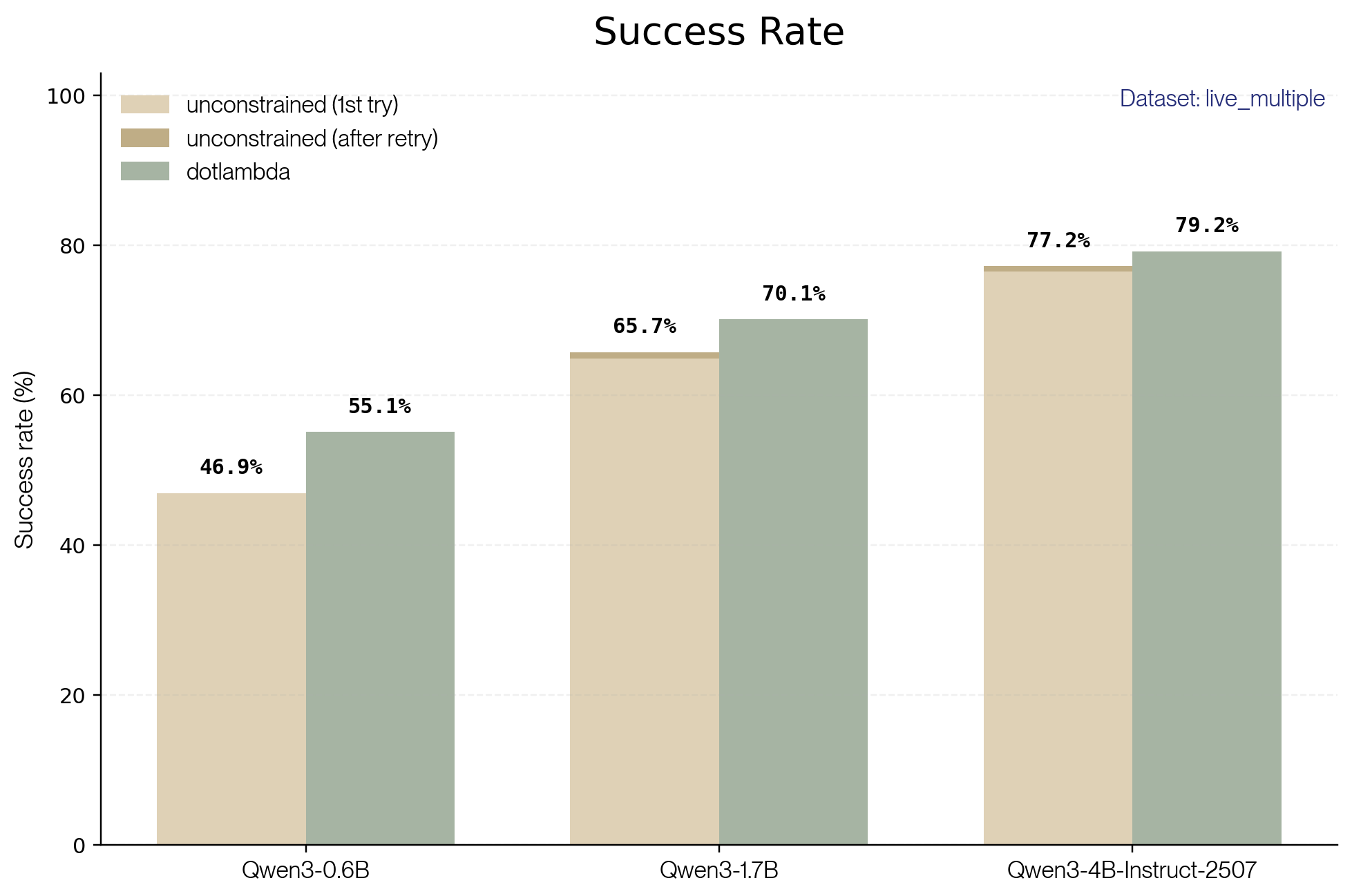
The results are clear: dotlambda outperforms the unconstrained baseline for every model tested, consistently reducing the failure rate by more than 10%. The gains are largest for smaller models, where schema violations are most frequent, and retries have a limited impact.
Failure reductions come from two sources. The first is eliminating syntax errors outright: cases where the output can't be decoded at all. The second is enforcing schema validity, which also rules out a class of semantic errors, cases where the model's mistake happens to violate a schema constraint, like picking a value outside an enum.
As an example, consider the following tool definition from evaluation item live_multiple_477-146-2:
{
  "type": "function",
  "function": {
    "name": "Music_3_LookupMusic",
    "description": "Finds songs that align with the user's musical preferences based on the artist, album, genre, and release year.",
    "parameters": {
      "type": "object",
      "properties": {
        "artist": {
          "type": "string",
          "description": "The name of the artist performing the song. Use 'dontcare' to ignore this criterion.",
          "default": "dontcare"
        },
        "album": {
          "type": "string",
          "description": "The name of the album that the song is part of. Use 'dontcare' to ignore this criterion.",
          "default": "dontcare"
        },
        "genre": {
          "type": "string",
          "description": "The genre of the music. Use 'dontcare' to indicate no specific preference.",
          "enum": ["Reggae", "Holiday", "Electropop", "Pop", "Asia", "House", "Electronica", "Funk", "Rock", "Metal", "Dubstep", "Country", "dontcare"],
          "default": "dontcare"
        },
        "year": {
          "type": "string",
          "description": "The year of the song's initial release. Format should be a four-digit number, e.g., '2001'. Use 'dontcare' to ignore this criterion.",
          "enum": ["2010", "2011", "2012", "2013", "2014", "2015", "2016", "2017", "2018", "2019", "dontcare"],
          "default": "dontcare"
        }
      },
      "required": []
    }
  }
}
The user input is the following:
I want to find a song now, and I know that there are some really good songs in the album called We Are Not Your Kind, I enjoy Rock-and-roll songs which are from the '19.
The unconstrained Qwen/Qwen3-4B-Instruct-2507 model gets it wrong, confused by the user's ambiguous phrasing of the year ('19) and then picking a value that is not listed in the enum.
{
  "Music_3_LookupMusic": {
    "album": "We Are Not Your Kind",
    "genre": "Rock",
    "year": "1991"
  }
}
The same model with dotlambda returns the correct response: every non-dontcare value in the year enum starts with 20, so constrained generation enforces those first two digits. Once they're locked in, the model picks the correct completion on its own.
{
  "Music_3_LookupMusic": {
    "album": "We Are Not Your Kind",
    "genre": "Rock",
    "year": "2019"
  }
}
The Limits of Retries
For unconstrained models, we also observed that the post-retry success rate is low, meaning that numerous extra generations were required for small gains in performance.
| Model | Items retried | Success during retries | Retry success rate |
|---|---|---|---|
| Qwen3-0.6B | 161 | 0 | 0% |
| Qwen3-1.7B | 65 | 9 | 13.8% |
| Qwen3-4B-Instruct-2507 | 26 | 8 | 30.8% |
Smaller models retry more often because they produce more schema violations, and their retries are less likely to succeed because the underlying error isn't one the model can recover from on a re-roll. Even for the largest model tested, retry success rates top out at around 30%.
These retries come at a cost: each retry generates additional tokens, directly increasing both latency and compute spend. And even when you pay that cost, retries can't recover most of the gains structured generation delivers up front.
Token Efficiency
Beyond avoiding retries, dotlambda also produces shorter first attempts. The unconstrained model tends to pad its initial response with superfluous tool calls, made-up properties, and long stretches of free-form text. Some of these trigger retries, but all of them inflate the first attempt itself. Altogether, these effects cut total tokens generated by 10-20% compared to the unconstrained baseline.
Take the following user input from evaluation item live_multiple_862-181-3:
Can you reserve a train ticket for me from New York to Los Angeles? My dad's birthday is on 05/15/2023, and I'd like to depart around 09:00 AM. Also, can you check if there are any trains available for that day.
The model with dotlambda calls only Trains_1_FindTrains to retrieve the list of available trains:
{
  "Trains_1_FindTrains": {
    "_from": "New York, NY",
    "to": "Los Angeles, CA",
    "date_of_journey": "2023-05-15",
    "_class": "Value",
    "number_of_adults": 1
  }
}
The unconstrained model also calls Trains_1_FindTrains, but adds an erroneous call to Trains_1_GetTrainTickets before it has any train availability to book against.
{
  "Trains_1_GetTrainTickets": {
    "_from": "New York, NY",
    "to": "Los Angeles, CA",
    "date_of_journey": "05/15/2023",
    "journey_start_time": "09:00",
    "number_of_adults": 1,
    "trip_protection": false,
    "_class": "Value"
  }
}
That additional tool call, which is likely to fail, results in 91 tokens being effectively lost (the body of the erroneous Trains_1_GetTrainTickets call adds 91 tokens).
Another angle: the average number of tokens needed to produce a valid tool call.
To compute this metric, we filter out items where either model produced a schema-valid, but semantically wrong response (wrong tool name or wrong argument values). We keep items where the model got the right answer or exhausted its retries on schema violations, counting the full token spend in both cases: that wasted budget is exactly the cost structured generation avoids. For every included item, we sum tokens generated across every attempt.
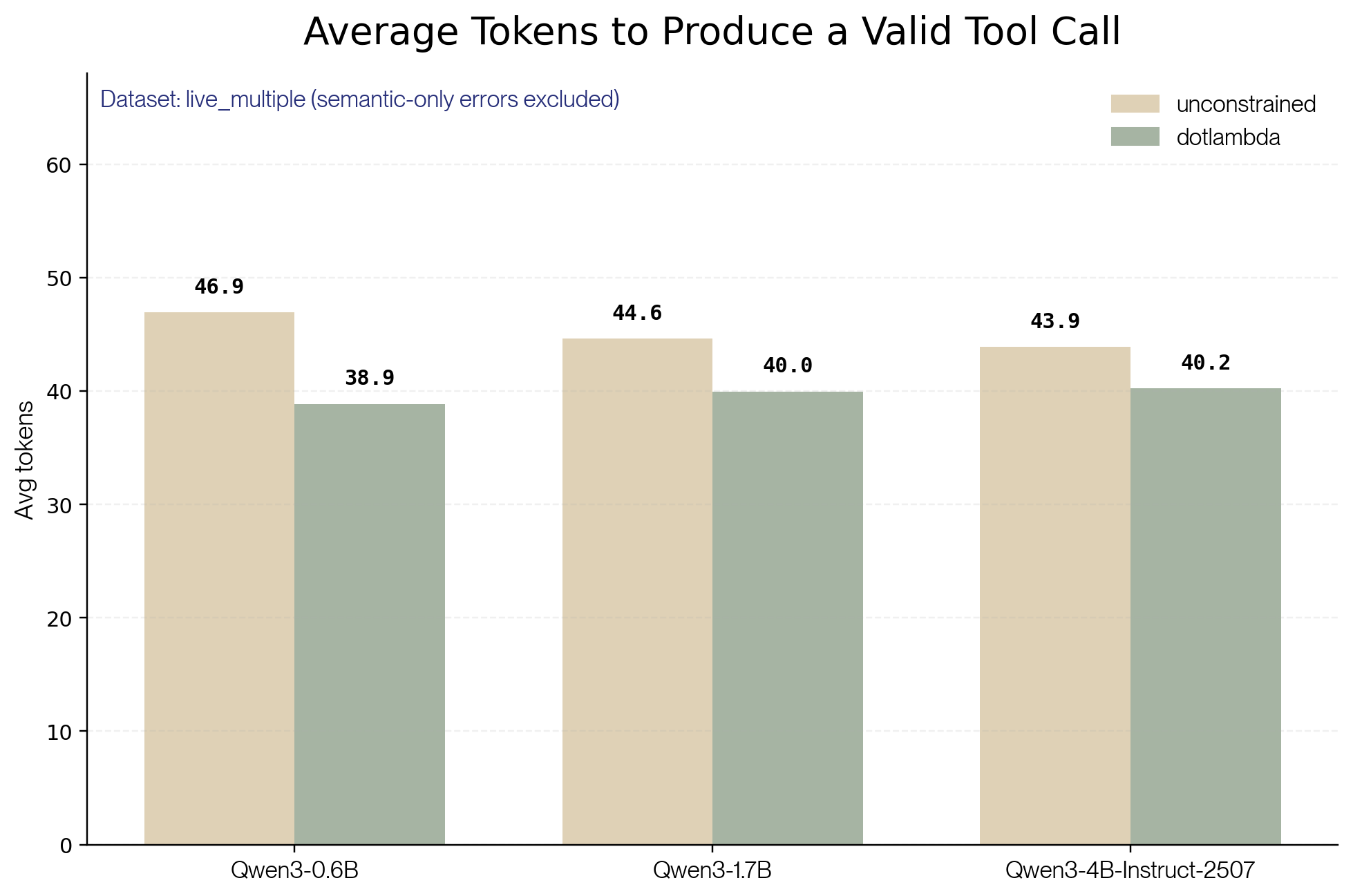
That gives us clear results once again: dotlambda reaches a valid tool call with fewer tokens than the unconstrained baseline for every model tested.
With constrained generation, more of your tool calls succeed, and you spend fewer tokens getting there.
Going Further with Coalescence
So far, we've shown that constrained generation lifts the success rate and increases token efficiency. Coalescence unlocks much larger savings. We cover it in depth in a dedicated blog post, but the idea is simple: whenever the next token is fully determined, either because it's part of the JSON syntax or because the schema leaves only one valid completion, we emit it directly instead of asking the model to predict it. The model only generates the tokens that actually carry information.
Take the response on live_multiple_862-181-3 again. Here's the raw output from the model with dotlambda:
<tool_call>\n{"name": "Trains_1_FindTrains", "arguments": {"_from": "New York, NY", "to": "Los Angeles, CA", "date_of_journey": "2023-05-15", "_class": "Value", "number_of_adults": 1}}\n</tool_call>\n<|im_end|>
With coalescence, the green tokens are filled in for free; the model only generates the blue ones.
<tool_call>\n{name: Trains_1_FindTrains, arguments: {_from: New York, NY, to: Los Angeles, CA, date_of_journey: 2023-05-15, _class: Value, number_of_adults: 1}}\n</tool_call>\n<|im_end|>Across the models we tested, coalescence consistently cuts the number of tokens generated by about 65%.
If you want to try out dotlambda, request access here.